
How to get an ONTAP One license when the system has 28 character keys?
Applies to
- ONTAP 9.10.1 and later
- FAS/AFF systems with 28-character ONTAP license keys, including CIFS_2 and SnapMirror_2
- Systems that have already had their 28 character keys converted to NLFs
Note: Does not apply to ASA or EDA systems.
Description
This article outlines steps to generate an ONTAP One license with 28-character ONTAP license key.
Procedure
- Login to NSS, click on Systems menu, choose Software Licenses and search by System Serial Number.
- Locate your CIFS_2 license and click on Check link in the Eligibility column.
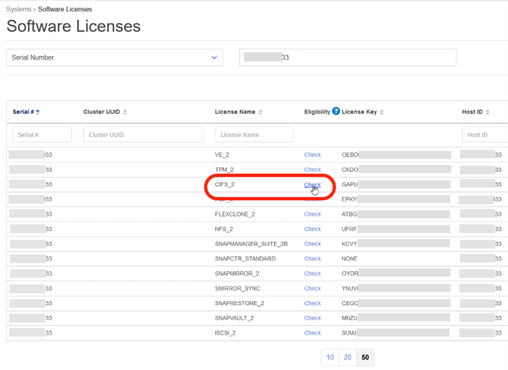
The Check Eligibility form dialog box will appear.
- Click on the Generate Licenses for 9.10.x and later button.

- The conversion process will take some time to complete, so click on Close to close the dialog box.
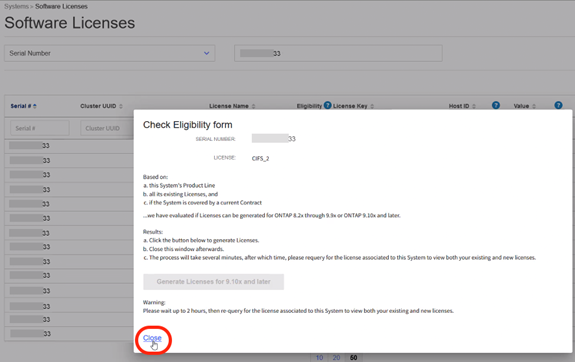
- After 2 hours, return to the Software Licenses page and query using your System Serial Number.
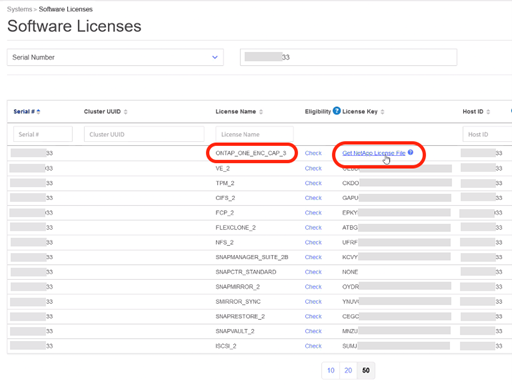
The ONTAP One license associated to your system should be available.
Note: If your system does not have SnapMirror, you will receive an ONTAP Base license.
- Click on the Get NetApp License File link and then follow the prompts to email or save your NLF.
Note: If you encounter any issues during the procedure, open a non-technical case for further assistance.
No Comments