
How to Identify the Serial Number of an ONTAP Platform?
https://kb.netapp.com/on-prem/ontap/OHW/OHW-KBs/How_to_Identify_Serial_Number_of_ONTAP_Platform
Applies to
- AFF Systems
- ASA Systems
- FAS Systems
Description
This article provides the steps to identify the serial number of an ONTAP platform, using both command line and System Manager.
Procedure
System Manager
- Go to the System Manager Dashboard page
- Hover over the desired node to check the serial number
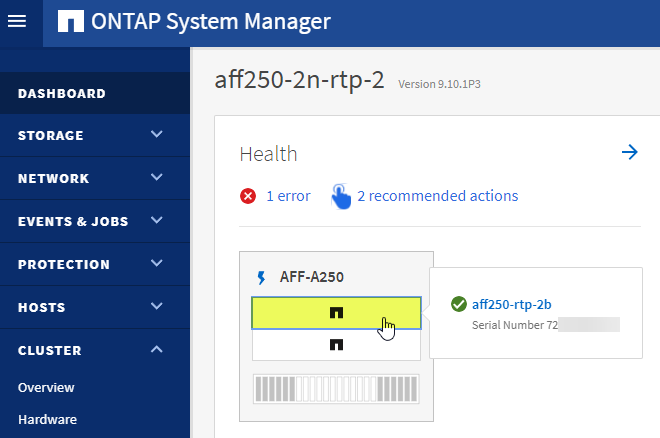
Command Line
- For cluster wide serial numbers, run
System Controller Showfrom the command line
a.For a more detailed view of an individual node, run system node show -node <node name> from the command line
::> system controller show
Controller Name           System ID     Serial Number     Model    Status
------------------------- ------------- ----------------- -------- -----------
NetAppA                  5xxxxxxxx     7xxxxxxxxxxx      AFF-A250 ok
NetAppB                  5xxxxxxxx     7xxxxxxxxxxx      AFF-A250 ok
::> node show -node NetAppB
                                              Node: NetAppB
                                             Owner: NetAppuser
                                          Location: rtp
                                             Model: AFF-A250
                                     Serial Number: 7xxxxxxxxxxx
                                         Asset Tag: -
                                            Uptime: 413 days 21:50
                                   NVRAM System ID: 5xxxxxxxx
                                         System ID: 05xxxxxxxx
                                            Vendor: NetApp
                                            Health: true
                                       Eligibility: true
                           Differentiated Services: false
                               All-Flash Optimized: true
                                Capacity Optimized: false
                                     QLC Optimized: false
                        All-Flash Select Optimized: false
                     SAS2/SAS3 Mixed Stack Support: none
2. From the sysconfig -a, we can see the below information:
 NetApp Release 9.10.1P12D8: Thu Nov 23 19:10:13 EST 2023
 System ID: 053xx48804 (scc09n14a); partner ID: 0537xx8813 (sccxx14b)
 System Serial Number: 721xx00001x8 (scc09n14a)  >>>>>>>>>>>>>>>>>>>>>>>>  SSN
 System Rev: A4
 System Storage Configuration: Multi-Path HA
 System ACP Connectivity: Inband Active
 SAS2/SAS3 Mixed Stack Support: all
 All-Flash Optimized: true
 Capacity Optimized: false
 All SAN Array: false
 Backplane Part Number: 111-0xx95
 Backplane Rev: A4
 Backplane Serial Number: 0218xx033849
 slot 0: System Board 1.7 GHz (System Board XXII B2)
                Model Name:         AFF-A300
                Part Number:        111-02493
                Revision:           B2
                Serial Number:      02182xx152x1   >>>>>>>>>>>>>>>>>  Board SN
                BIOS version:       11.20
                Loader version:     6.0.17
No Comments